
Webhooks
Receive real-time event notifications the moment something changes in VaultN — orders, inventory, prices, promotions, and more — delivered straight to your systems via signed HTTPS POST.
Guide
- 1. How webhooks work
- 2. Setting up (UI)
- 3. What VaultN sends
- 4. Building a receiver
- 5. Delivery behaviour
- 6. Designing automations
- 7. Event catalogue
- 8. Secret rotation
- 9. Troubleshooting
Navigate this guide using the menu above. §1–3 are for everyone. §4–6 are for developers. §7 is the event catalogue — the automation ideas live there.
1. How webhooks work, end to end
Webhooks are how VaultN tells your systems that something has changed — a new order, an inventory movement, a price update, a connection change — without you having to poll our APIs. When an event happens, VaultN sends an HTTPS POST to a URL you control, with a signed JSON payload. You react. That reaction is your automation.
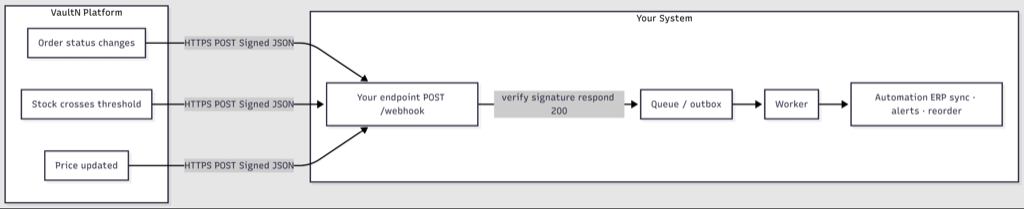
Things to know up front
- 🔁 At-least-once delivery — The same event may arrive more than once. Your handler must be idempotent — see §5.
- ⚡ 15-second timeout — Reply quickly; do work asynchronously. VaultN times out after 15 seconds and treats it as a transient failure.
- 🔄 Automatic retries — Exponential backoff for ~26 hours, up to 10 attempts. After that, reconcile state via our APIs.
- 🔒 Signed payloads — Every request carries an
X-VaultN-SignatureHMAC. Verify it before trusting the body.
Not strictly ordered. Two events about the same entity can arrive out of order. Use timestamps inside the payload, not arrival order. Endpoints must be
https://— no localhost or self-signed certs in production.
2. Setting up a webhook (UI)
You manage webhooks from the VaultN Portal → Account & Help → Developer → Webhooks section.
Create a subscription
1. Click New subscription
2. Fill in the details
- Endpoint URL — the public HTTPS URL where VaultN should send events. Get this from your dev team. For local development, use a tunnel like
ngrokorwebhook.site. - Event types — pick one or more from the catalogue (§7). You can change this later.
- Custom secret (optional) — leave blank to let VaultN generate one. Only set this if you have a specific reason, e.g. centralized secret rotation.
- Active — leave on. Toggle off to pause deliveries without losing the subscription.
3. Click Save
4. Copy the secret immediately
It's shown once. Hand it to your dev team via your secret manager. If you lose it, you'll need to rotate — see §8.
Important: The webhook secret is only shown once at creation. Store it safely and immediately. If it's lost, you must rotate to get a new one.
3. What VaultN sends
Each delivery is a standard POST request with Content-Type: application/json; charset=utf-8. The body follows the CloudEvents 1.0 envelope shape.
Headers
| Header | Example | Purpose |
|---|---|---|
X-VaultN-Signature | sha256=5e3f8a91… | HMAC-SHA256 of the raw body, lowercase hex. Always verify. |
X-VaultN-Delivery-Id | 8e7c23d0-ade9-… | Unique per HTTP attempt (changes between retries). Useful for support. |
User-Agent | VaultN-Webhooks/1.0 | Allowlist this in your WAF if needed. |
X-VaultN-Instance-Id | webhook-delivery-7c4b9f | Sender instance — quote it when raising support tickets. |
Payload envelope
Every event body has the same outer shape. Only the data block varies.
{
  "id": "f1a2b3c4-d5e6-7890-abcd-ef1234567890",
  "source": "vaultn.platform",
  "specversion": "1.0",
  "type": "vaultn.order.status.changed",
  "subject": "orders/f6a7b8c9-d0e1-2345-fabc-456789012345",
  "time": "2026-04-27T10:32:18Z",
  "datacontenttype": "application/json",
  "data": { "...event-specific fields..." }
}| Field | Notes |
|---|---|
id | Stable event ID. Same value across all retries of the same event. Use this as your idempotency key. |
source | Always vaultn.platform. |
specversion | CloudEvents version. Today: 1.0. |
type | One of the catalogue keys in §7. Switch on this in your handler. |
subject | Structured {resourceType}/{guid} path (e.g. orders/{orderGuid}, products/{productGuid}). Useful for logs and routing. |
time | When the event occurred, UTC, ISO 8601. |
datacontenttype | Always application/json. |
data | Event-specific payload — see §7. All field names are camelCase, all timestamps UTC. |
4. Building a receiver
Endpoint requirements
- Public HTTPS URL with a valid TLS certificate (no self-signed).
- Accepts POST with
application/json. Read the body as raw bytes before parsing — you need the raw bytes for signature verification. - Responds within 15 seconds. VaultN times out after that and treats it as a transient failure.
- Returns 2xx on success. Anything else is treated as a failure — see §5.
The standard pattern: verify → enqueue → 200. Never run heavy business logic inside the request handler. Drop the verified event onto a queue (SQS, RabbitMQ, Postgres outbox) and process it from a worker. This keeps your endpoint fast and resilient under bursts.
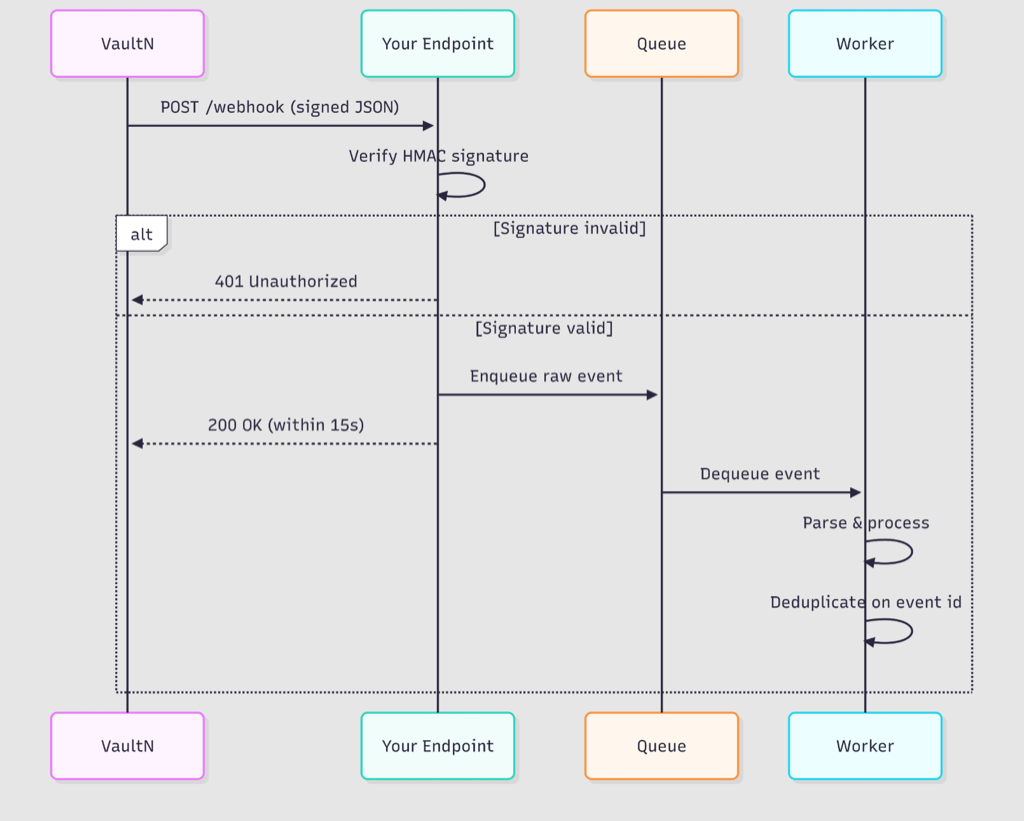
Verifying the signature
VaultN signs the raw request body with HMAC-SHA256 using your subscription's secret. The hex digest is sent as X-VaultN-Signature: sha256=<hex>.
Three rules:
- The secret is Base64-encoded. Base64-decode it before using it as the HMAC key. (The #1 cause of "signature never matches.")
- Hash the raw bytes of the request body, before any JSON parsing or re-serialization. Re-ordered keys or normalized whitespace will break the comparison.
- Use a constant-time comparison to avoid timing attacks:
crypto.timingSafeEqual,hmac.compare_digest, orCryptographicOperations.FixedTimeEquals.
Node.js
import crypto from "node:crypto";

const SECRET_B64 = process.env.VAULTN_WEBHOOK_SECRET;

export function verify(req, rawBody) {
  const header = req.headers["x-vaultn-signature"];
  if (!header?.startsWith("sha256=")) return false;

  const expected = crypto
    .createHmac("sha256", Buffer.from(SECRET_B64, "base64"))
    .update(rawBody)
    .digest("hex");

  const received = header.slice("sha256=".length);
  return (
    received.length === expected.length &&
    crypto.timingSafeEqual(Buffer.from(received), Buffer.from(expected))
  );
}
Express tip: Register
express.raw({ type: "application/json" })on the webhook route soreq.bodyis the rawBuffer. Don't useexpress.json()— it parses and discards the original bytes.
Python
import base64, hmac, hashlib, os

SECRET = base64.b64decode(os.environ["VAULTN_WEBHOOK_SECRET"])

def verify(headers: dict, raw_body: bytes) -> bool:
    header = headers.get("X-VaultN-Signature", "")
    if not header.startswith("sha256="):
        return False
    expected = hmac.new(SECRET, raw_body, hashlib.sha256).hexdigest()
    return hmac.compare_digest(header[len("sha256="):], expected)
C# (.NET)
using System.Security.Cryptography;
using System.Text;

public static bool Verify(string signatureHeader, byte[] rawBody, string secretB64)
{
    if (!signatureHeader.StartsWith("sha256=")) return false;

    using var hmac = new HMACSHA256(Convert.FromBase64String(secretB64));
    var computed = Convert.ToHexString(hmac.ComputeHash(rawBody)).ToLowerInvariant();
    var received = signatureHeader["sha256=".Length..];

    return CryptographicOperations.FixedTimeEquals(
        Encoding.ASCII.GetBytes(received),
        Encoding.ASCII.GetBytes(computed));
}
5. How deliveries behave
Response handling
| Your response | VaultN does |
|---|---|
2xx | Marks delivery success. |
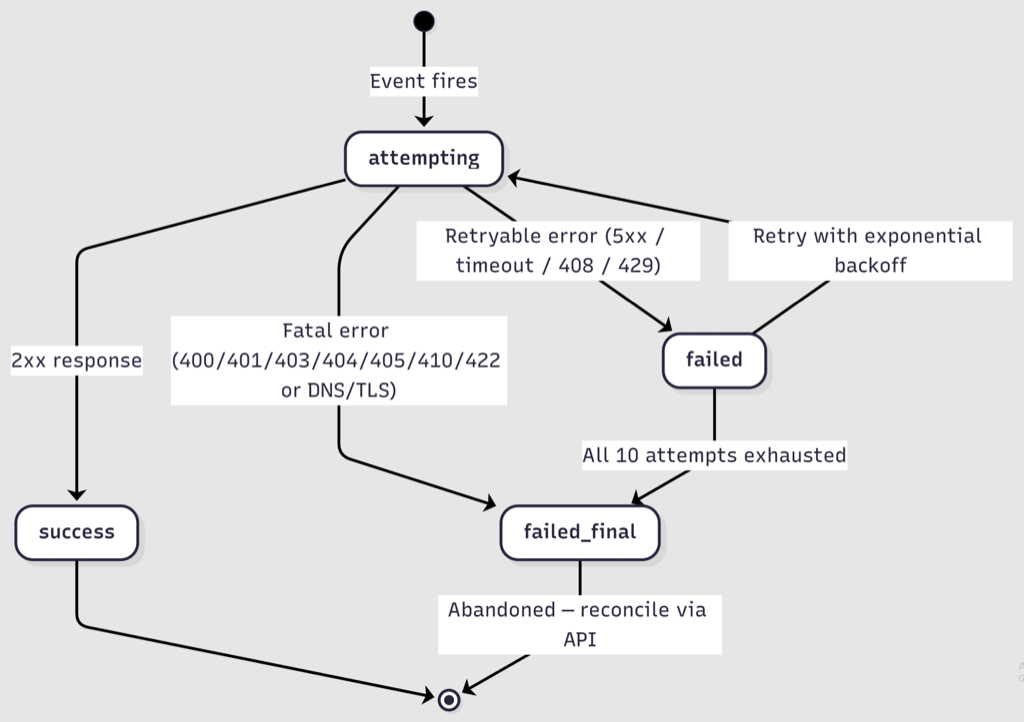
408, 429, 5xx, network/timeout/TLS error | Retries on schedule. |
400, 401, 403, 404, 405, 410, 422 | Marks delivery failed_final immediately. No retries, not replayable. |
| DNS or certificate error | Marks delivery failed_final immediately. |
Important: Fatal status codes indicate the endpoint will never accept the request. Don't return400from your handler for transient issues — return5xxso VaultN retries.
Retry schedule
Up to 10 attempts with exponential backoff and ±10% jitter. Total window: ~26 hours from the first failure.
| Attempt | Delay after previous |
|---|---|
| 2 | 1 minute |
| 3 | 2 minutes |
| 4 | 4 minutes |
| 5 | 8 minutes |
| 6 | 16 minutes |
| 7 | 29 minutes |
| 8 | 1 hour |
| 9 | 2 hours |
| 10 | 22 hours |
After attempt 10 fails, the delivery is marked failed_final and abandoned. Plan your incident response to fit inside that window — to catch up on missed state, reconcile via the VaultN APIs.
Idempotency
Because delivery is at-least-once, your handler will see duplicates eventually. Make handlers idempotent:
- Key on the envelope's
id(stable across retries) — not onX-VaultN-Delivery-Id(changes per attempt). - Persist seen IDs for at least the retry window (~26 hours). A small cache (Redis with TTL, or a
processed_eventstable with a unique index onid) is enough. - Make side effects safe to repeat —
UPSERTrather thanINSERT; "set status to X" rather than "increment counter."
Ordering
Deliveries are dispatched concurrently and may arrive out of order — even without retries, variable network latency can reorder events. Two common examples:
- An order moves
Pending → BackOrder, then laterBackOrder → Completed. You may see the→ Completedevent first. - A SKU goes out of stock and back in within a minute. The "back in stock" event may land first.
Defences: compare the time in the payload against the most recent time you've seen for the same entity. Use explicit previousStatus/newStatus fields rather than inferring from arrival order.
Pause and recovery
- Pause: toggle the subscription Inactive in the UI. New events stop being delivered.
- After the retry window: once a delivery hits
failed_final, it's abandoned. Reconcile via our APIs. - No backfill: webhooks only deliver events that occur after the subscription is created. For historical state, query our APIs.
6. Designing automations
- 🔍 Event-then-fetch — Use the webhook for the what and identifiers, then call our APIs for full current state. This sidesteps ordering issues at the cost of one extra request.
- ⚡ Event-only — For lightweight automations (Slack alerts, simple metrics), the payload alone is enough. Don't over-engineer.
- 📥 Outbox on your side — Persist verified events to your own outbox table before the worker processes them. You get free replay from your DB, decoupled from VaultN's 26-hour window.
- 🎯 Subscribe narrowly — Pick only the event types you act on. "Subscribe to everything" generates noise, more retries, and harder debugging. You can change the list any time.
Separate subscriptions per use case. Two automations with different reliability needs? Use two subscriptions. They get independent delivery histories and won't fail-cascade into each other. Also: monitor your side — track deliveries received, signature failures, and processing latency. The most common silent failure is a deploy that breaks signature verification.
7. Event catalogue
For each event: when it fires, what you'd typically build with it, and an example payload. The first example below shows the complete envelope. Subsequent events abbreviate the outer fields with "id": "..." for brevity — the envelope structure (§3) is identical for every event.
Orders
vaultn.order.status.changed
vaultn.order.status.changedFires when: an order's status transitions to a new value. Always carries previousStatus and newStatus.
Use it for: syncing order state into your ERP, triggering fulfillment, refund flows, customer notifications on completion.
Status values: Pending, Completed, Cancelled, NoStock, Error, BackOrder, PreOrder. Common transitions: Pending → Completed (completed reservations), Pending → BackOrder / PreOrder (stock not immediate), BackOrder → Completed (fulfilled when stock arrived), Pending → Cancelled (Expired reservations), BackOrder/PreOrder/Completed → Cancelled (Returns).
{
  "id": "f1a2b3c4-d5e6-7890-abcd-ef1234567890",
  "source": "vaultn.platform",
  "specversion": "1.0",
  "type": "vaultn.order.status.changed",
  "subject": "orders/f6a7b8c9-d0e1-2345-fabc-456789012345",
  "time": "2026-04-27T10:32:18Z",
  "datacontenttype": "application/json",
  "data": {
    "orderGuid": "f6a7b8c9-d0e1-2345-fabc-456789012345",
    "clientOrderReference": "ORD-2026-00123",
    "previousStatus": "Pending",
    "newStatus": "Completed"
  }
}
vaultn.order.backorder.fulfilled
vaultn.order.backorder.fulfilledFires when: a backordered line on an order becomes available and is fulfilled.
Use it for: notifying the buyer, releasing the line to delivery, updating dashboards that track backorder ageing.
{
  "id": "...",
  "type": "vaultn.order.backorder.fulfilled",
  "subject": "orders/f6a7b8c9-d0e1-2345-fabc-456789012345",
  "time": "2026-04-27T10:32:18Z",
  "data": {
    "productGuid": "a1b2c3d4-e5f6-7890-abcd-ef1234567890",
    "productId": "PROD-001",
    "productName": "Super Adventure Game - Gold Edition",
    "sku": "SAG-GOLD-EU-STEAM",
    "orderGuid": "f6a7b8c9-d0e1-2345-fabc-456789012345",
    "clientOrderReference": "ORD-2026-00123",
    "quantity": 1
  }
}
vaultn.order.preorder.fulfilled
vaultn.order.preorder.fulfilledFires when: a preordered line becomes available and is fulfilled. Same shape as backorder.fulfilled.
Use it for: release-day notifications, kicking off post-purchase email flows.
Inventory
Note: Threshold events (
status.changed,stockpool.low,network.low) are emitted by periodic background jobs, not real-time per stock change. Expect a small delay (typically a few minutes) between the actual stock movement and the webhook delivery. This prevents event flapping when stock fluctuates rapidly around a threshold. Reduction events (network.reduction,stockpool.reduction) are emitted immediately when an extraction commits.
vaultn.inventory.status.changed
Fires when: a SKU transitions in or out of stock. Does not fire on every quantity change — only on the in-stock/out-of-stock boundary. currentQuantity is 0 when going out of stock and the newly available quantity when coming back in.
Use it for: flipping the "Buy" button on a storefront, Slack alerts when a hot title goes out, refreshing PDP cache.
{
  "id": "...",
  "type": "vaultn.inventory.status.changed",
  "subject": "products/a1b2c3d4-e5f6-7890-abcd-ef1234567890",
  "time": "2026-04-27T10:32:18Z",
  "data": {
    "productGuid": "a1b2c3d4-e5f6-7890-abcd-ef1234567890",
    "productId": "48213",
    "productName": "Super Adventure Game - Gold Edition",
    "sku": "SAG-GOLD-EU-STEAM",
    "previousStatus": "Out of Stock",
    "newStatus": "In Stock",
    "currentQuantity": 250,
    "connectionGuid": "a7b8c9d0-e1f2-3456-abcd-567890123456"
  }
}
vaultn.inventory.stockpool.assigned
Fires when: keys are assigned to a stockpool. Carries the active window (startDate/endDate) when set — both fields are nullable. If endDate is absent the keys are available indefinitely.
Use it for: understanding how much additional reserved stock has been allocated to you, projecting upcoming stock in planning tools.
{
  "id": "...",
  "type": "vaultn.inventory.stockpool.assigned",
  "subject": "products/a1b2c3d4-e5f6-7890-abcd-ef1234567890",
  "time": "2026-04-27T10:32:18Z",
  "data": {
    "stockpoolName": "EU Steam Pool Q1",
    "productGuid": "a1b2c3d4-e5f6-7890-abcd-ef1234567890",
    "productId": "48213",
    "productName": "Super Adventure Game - Gold Edition",
    "sku": "SAG-GOLD-EU-STEAM",
    "quantity": 500,
    "startDate": "2026-03-01T00:00:00Z",  // nullable
    "endDate": "2026-03-31T23:59:59Z",    // nullable
    "connectionGuid": "a7b8c9d0-e1f2-3456-abcd-567890123456"
  }
}
vaultn.inventory.stockpool.low
Fires when: a stockpool's available keys drop at or below its configured warning threshold. Fires per crossing event — if stock recovers and falls below again, you'll get another event.
Use it for: auto-requesting more keys, opening a procurement ticket, triggering an outreach to your supplier.
threshold is the pool's configured warning percentage (e.g. 10 = fire when stock falls below 10% of the pool's max). It is not a key count, so it is not directly comparable to currentStock.
{
  "id": "...",
  "type": "vaultn.inventory.stockpool.low",
  "subject": "products/a1b2c3d4-e5f6-7890-abcd-ef1234567890",
  "time": "2026-04-27T10:32:18Z",
  "data": {
    "stockpoolName": "EU Steam Pool Q1",
    "productGuid": "a1b2c3d4-e5f6-7890-abcd-ef1234567890",
    "productId": "48213",
    "productName": "Super Adventure Game - Gold Edition",
    "sku": "SAG-GOLD-EU-STEAM",
    "currentStock": 45,
    "threshold": 10,
    "connectionGuid": "a7b8c9d0-e1f2-3456-abcd-567890123456"
  }
}
vaultn.inventory.network.low
Fires when: the network key count for a SKU (excluding stockpool keys) drops at or below the configured threshold. Default threshold is 500, server-side configurable. This event is scoped to the tenant and SKU — it does not carry a connectionGuid.
Use it for: the same patterns as stockpool.low, but for shared-network inventory.
{
  "id": "...",
  "type": "vaultn.inventory.network.low",
  "subject": "products/a1b2c3d4-e5f6-7890-abcd-ef1234567890",
  "time": "2026-04-27T10:32:18Z",
  "data": {
    "productGuid": "a1b2c3d4-e5f6-7890-abcd-ef1234567890",
    "productId": "48213",
    "productName": "Super Adventure Game - Gold Edition",
    "sku": "SAG-GOLD-EU-STEAM",
    "currentStock": 8,
    "threshold": 10
  }
}
vaultn.inventory.network.reduction
Fires when: keys are extracted from network (non-stockpool) inventory, reducing what is available to sell. This event is scoped to the tenant and SKU — it does not carry a connectionGuid.
Use it for: tracking unexpected stock drops, reconciling key counts, triggering replenishment workflows.
The subtype field changes how quantity should be read:
| subtype | Who receives it | What quantity means |
|---|---|---|
inventory | Every retailer with an active sharing rule covering the SKU | The total keys extracted — every recipient sees the same number, not their own loss |
revoked | Each retailer whose keys were revoked | That recipient's own revoked count |
{
  "id": "...",
  "type": "vaultn.inventory.network.reduction",
  "subject": "products/a1b2c3d4-e5f6-7890-abcd-ef1234567890",
  "time": "2026-04-27T10:32:18Z",
  "data": {
    "productGuid": "a1b2c3d4-e5f6-7890-abcd-ef1234567890",
    "productId": "48213",
    "productName": "Super Adventure Game - Gold Edition",
    "sku": "SAG-GOLD-EU-STEAM",
    "quantity": 250,
    "subtype": "inventory",
    "extractedAtUtc": "2026-04-27T10:32:18.4821973Z"
  }
}
vaultn.inventory.stockpool.reduction
Fires when: keys are extracted from a stockpool, reducing the pool's remaining balance. Sent to every receiver assigned to the stockpool — each receives the same total quantity, not a per-receiver delta. Emitted only after the extraction commits.
Use it for: tracking stockpool drawdowns, triggering replenishment, auditing key extraction history.
The scope field indicates which keys in the pool were eligible for extraction: unassigned means only keys not yet allocated to a receiver were eligible; all means the entire pool. A scope: "all" extraction can also push a receiver's bucket to zero, which raises a separate vaultn.inventory.status.changed event.
{
  "id": "...",
  "type": "vaultn.inventory.stockpool.reduction",
  "subject": "products/a1b2c3d4-e5f6-7890-abcd-ef1234567890",
  "time": "2026-04-27T10:32:18Z",
  "data": {
    "stockpoolId": "4821",
    "stockpoolName": "EU Steam Pool Q1",
    "productGuid": "a1b2c3d4-e5f6-7890-abcd-ef1234567890",
    "productId": "48213",
    "productName": "Super Adventure Game - Gold Edition",
    "sku": "SAG-GOLD-EU-STEAM",
    "quantity": 120,
    "scope": "unassigned",
    "extractedAtUtc": "2026-04-27T10:32:18.4821973Z"
  }
}
SKU
vaultn.sku.shared
vaultn.sku.sharedFires when: a SKU is shared with you by a connection.
Use it for: auto-importing the SKU into your catalog, triggering a review workflow.
{
  "id": "...",
  "type": "vaultn.sku.shared",
  "subject": "products/a1b2c3d4-e5f6-7890-abcd-ef1234567890",
  "time": "2026-04-27T10:32:18Z",
  "data": {
    "productGuid": "a1b2c3d4-e5f6-7890-abcd-ef1234567890",
    "productId": "PROD-001",
    "productName": "Super Adventure Game - Gold Edition",
    "sku": "SAG-GOLD-EU-STEAM"
  }
}
vaultn.sku.deactivated
vaultn.sku.deactivatedFires when: a SKU is deactivated and should no longer be sold.
Use it for: taking the SKU offline in your store, blocking new orders.
{
  "id": "...",
  "type": "vaultn.sku.deactivated",
  "subject": "products/a1b2c3d4-e5f6-7890-abcd-ef1234567890",
  "time": "2026-04-27T10:32:18Z",
  "data": {
    "productGuid": "a1b2c3d4-e5f6-7890-abcd-ef1234567890",
    "productId": "PROD-001",
    "productName": "Super Adventure Game - Gold Edition",
    "sku": "SAG-GOLD-EU-STEAM"
  }
}
Product
vaultn.product.shared
vaultn.product.sharedFires when: a product (parent of SKUs) is shared on a connection.
Use it for: retrieving meta-data for a single product using /api/v4/Product/ instead of daily full catalog requests.
{
  "id": "...",
  "type": "vaultn.product.shared",
  "subject": "products/a1b2c3d4-e5f6-7890-abcd-ef1234567890",
  "time": "2026-04-27T10:32:18Z",
  "data": {
    "productGuid": "a1b2c3d4-e5f6-7890-abcd-ef1234567890",
    "productId": "PROD-001",
    "productName": "Super Adventure Game - Gold Edition"
  }
}
vaultn.product.removed
vaultn.product.removedFires when: a product is removed from a connection.
Use it for: removing it from your store.
{
  "id": "...",
  "type": "vaultn.product.removed",
  "subject": "products/a1b2c3d4-e5f6-7890-abcd-ef1234567890",
  "time": "2026-04-27T10:32:18Z",
  "data": {
    "productGuid": "a1b2c3d4-e5f6-7890-abcd-ef1234567890",
    "productId": "PROD-001",
    "productName": "Super Adventure Game - Gold Edition"
  }
}
vaultn.product.delisting.scheduled
vaultn.product.delisting.scheduledFires when: a future delisting is scheduled. Carries the planned delistingDate.
Use it for: planning the removal of products and SKUs from store before orders are blocked.
{
  "id": "...",
  "type": "vaultn.product.delisting.scheduled",
  "subject": "products/a1b2c3d4-e5f6-7890-abcd-ef1234567890",
  "time": "2026-04-27T10:32:18Z",
  "data": {
    "productGuid": "a1b2c3d4-e5f6-7890-abcd-ef1234567890",
    "productId": "PROD-001",
    "productName": "Super Adventure Game - Gold Edition",
    "delistingDate": "2026-05-31T23:59:59Z"
  }
}
vaultn.product.delisted
vaultn.product.delistedFires when: a product is delisted (end of life).
Use it for: removing it from your store if not done so already.
{
  "id": "...",
  "type": "vaultn.product.delisted",
  "subject": "products/a1b2c3d4-e5f6-7890-abcd-ef1234567890",
  "time": "2026-04-27T10:32:18Z",
  "data": {
    "productGuid": "a1b2c3d4-e5f6-7890-abcd-ef1234567890",
    "productId": "PROD-001",
    "productName": "Super Adventure Game - Gold Edition"
  }
}
vaultn.product.info.updated
vaultn.product.info.updatedFires when: any product metadata field changes. The changedFields list tells you exactly which fields changed so you only re-fetch what you need.
Use it for: keeping your catalog metadata up to date with the latest available information.
{
  "id": "...",
  "type": "vaultn.product.info.updated",
  "subject": "products/a1b2c3d4-e5f6-7890-abcd-ef1234567890",
  "time": "2026-04-27T10:32:18Z",
  "data": {
    "productGuid": "a1b2c3d4-e5f6-7890-abcd-ef1234567890",
    "productId": "PROD-001",
    "productName": "Super Adventure Game - Gold Edition",
    "changedFields": ["description", "releaseDate", "genres"]
  }
}
Pricing
vaultn.price.changed
vaultn.price.changedFires when: SRP, purchase price, or VAT changes for a product on a connection/region. Carries both previousPricing and newPricing so you can compute deltas without an extra fetch.
Use it for: repricing on your store front, margin alerts, audit logs.
{
  "id": "...",
  "type": "vaultn.price.changed",
  "subject": "products/a1b2c3d4-e5f6-7890-abcd-ef1234567890",
  "time": "2026-04-27T10:32:18Z",
  "data": {
    "productGuid": "a1b2c3d4-e5f6-7890-abcd-ef1234567890",
    "productId": "PROD-001",
    "productName": "Super Adventure Game - Gold Edition",
    "regionCode": "EU",
    "connectionGuid": "a7b8c9d0-e1f2-3456-abcd-567890123456",
    "previousPricing": {
      "srp": 49.99,
      "purchasePrice": 34.99,
      "priceListVat": 19.0,
      "currencyCode": "EUR"
    },
    "newPricing": {
      "srp": 39.99,
      "purchasePrice": 27.99,
      "priceListVat": 19.0,
      "currencyCode": "EUR"
    }
  }
}
PriceListVat: Changes to
PriceListVatare only relevant if you are on a Revenue share business model with your partner.
vaultn.pricelist.assigned
vaultn.pricelist.assignedFires when: a pricelist is assigned to a connection.
Use it for: triggering a full price refresh for products on that connection.
{
  "id": "...",
  "type": "vaultn.pricelist.assigned",
  "subject": "pricelists/b2c3d4e5-f6a7-8901-bcde-f12345678901",
  "time": "2026-04-27T10:32:18Z",
  "data": {
    "priceListGuid": "b2c3d4e5-f6a7-8901-bcde-f12345678901",
    "priceListName": "EU Standard Pricelist Q1 2026",
    "connectionGuid": "a7b8c9d0-e1f2-3456-abcd-567890123456",
    "connectionName": "Partner Corp"
  }
}
Promotions
Who is who in promotion events:
ownerandconnectionNameboth name the publisher sharing the promotion with you — never your own vault.connectionGuidis the machine-readable identifier of the relationship the promotion is shared through; use it to correlate promotions across events. Promotion events are sent to receivers only — you never receive events for promotions you own.
vaultn.promotion.shared
Fires when: a publisher publishes a promotion that is connected to you (it becomes Scheduled), or adds your connection to an existing, already-published promotion. Carries the scheduledStartDate.
Use it for: planning and importing upcoming promotion details using the /api/v4/connection/{connectionGuid}/promotion/{promotionGuid}/discounts endpoint.
{
  "id": "...",
  "type": "vaultn.promotion.shared",
  "subject": "promotions/e5f6a7b8-c9d0-1234-efab-345678901234",
  "time": "2026-04-27T10:32:18Z",
  "data": {
    "promotionGuid": "e5f6a7b8-c9d0-1234-efab-345678901234",
    "promotionId": "1042",
    "promotionName": "Spring Sale 2026",
    "owner": "Acme Publishing",
    "scheduledStartDate": "2026-05-01T00:00:00Z",
    "connectionGuid": "a7b8c9d0-e1f2-3456-abcd-567890123456",
    "connectionName": "Acme Publishing"
  }
}
vaultn.promotion.started
Fires when: a promotion you are connected to becomes active — whether the platform activated it on its start date or the publisher activated it manually. One event per connection.
Use it for: switching promotional pricing live, publishing promo landing pages.
{
  "id": "...",
  "type": "vaultn.promotion.started",
  "subject": "promotions/e5f6a7b8-c9d0-1234-efab-345678901234",
  "time": "2026-05-01T00:00:14Z",
  "data": {
    "promotionGuid": "e5f6a7b8-c9d0-1234-efab-345678901234",
    "promotionId": "1042",
    "promotionName": "Spring Sale 2026",
    "owner": "Acme Publishing",
    "startDate": "2026-05-01T00:00:00Z",
    "endDate": "2026-05-31T23:59:59Z",
    "connectionGuid": "a7b8c9d0-e1f2-3456-abcd-567890123456",
    "connectionName": "Acme Publishing"
  }
}
vaultn.promotion.ended
Fires when: a promotion you are connected to stops being active — it expired on its end date, or the publisher cancelled it. The event does not distinguish a cancellation from a natural end.
Use it for: reverting to standard pricing, taking down promo content.
{
  "id": "...",
  "type": "vaultn.promotion.ended",
  "subject": "promotions/e5f6a7b8-c9d0-1234-efab-345678901234",
  "time": "2026-06-01T00:00:09Z",
  "data": {
    "promotionGuid": "e5f6a7b8-c9d0-1234-efab-345678901234",
    "promotionId": "1042",
    "promotionName": "Spring Sale 2026",
    "owner": "Acme Publishing",
    "connectionGuid": "a7b8c9d0-e1f2-3456-abcd-567890123456",
    "connectionName": "Acme Publishing"
  }
}
vaultn.promotion.changed
Fires when: a non-Draft promotion you are connected to actually changes — its fields/dates are edited, or its items/discounts change (including changes applied through imports). It does not fire for Draft edits, for pure status transitions (see started/ended), for saves that change nothing, or when a connection is added to or removed from the promotion (those are covered by shared).
Use it for: re-syncing promotion terms, refreshing cached discounts.
The payload comes in two flavors, depending on what was edited:
- Field/date edit —
changedFieldslists the names of the fields that changed (previous/new values are not included). All four SKU fields arenull. - Item/discount edit —
changedFieldsis[].updatedSkuCountcounts the SKUs actually added or whose discount actually changed;deletedSkuCountcounts the SKUs actually removed. Rows resubmitted without a change are not counted.
SKU lists are complete or absent — never truncated.
changedSkusanddeletedSkusare present only when they can name every affected SKU (at most 10). If more than 10 SKUs are affected, the list isnulland only the counts are sent — use them to decide whether to re-fetch the promotion items via the API. A non-null list can always be trusted as the complete set; the counts always carry the full totals either way.
Field/date edit
{
  "id": "...",
  "type": "vaultn.promotion.changed",
  "subject": "promotions/e5f6a7b8-c9d0-1234-efab-345678901234",
  "time": "2026-05-10T14:03:41Z",
  "data": {
    "promotionGuid": "e5f6a7b8-c9d0-1234-efab-345678901234",
    "promotionId": "1042",
    "promotionName": "Spring Sale 2026",
    "owner": "Acme Publishing",
    "connectionGuid": "a7b8c9d0-e1f2-3456-abcd-567890123456",
    "connectionName": "Acme Publishing",
    "changedFields": ["Title", "ValidTo"],
    "updatedSkuCount": null,
    "deletedSkuCount": null,
    "changedSkus": null,
    "deletedSkus": null
  }
}
Item/discount edit (2 discounts changed, 1 SKU removed)
{
  "id": "...",
  "type": "vaultn.promotion.changed",
  "subject": "promotions/e5f6a7b8-c9d0-1234-efab-345678901234",
  "time": "2026-05-12T09:17:22Z",
  "data": {
    "promotionGuid": "e5f6a7b8-c9d0-1234-efab-345678901234",
    "promotionId": "1042",
    "promotionName": "Spring Sale 2026",
    "owner": "Acme Publishing",
    "connectionGuid": "a7b8c9d0-e1f2-3456-abcd-567890123456",
    "connectionName": "Acme Publishing",
    "changedFields": [],
    "updatedSkuCount": 2,
    "deletedSkuCount": 1,
    "changedSkus": ["SAG-GOLD-EU-STEAM", "SAG-STD-EU-STEAM"],
    "deletedSkus": ["SAG-DLX-EU-STEAM"]
  }
}
Connection
vaultn.connection.status.changed
Fires when: a connection's status transitions (e.g. Pending → Active, Active → Suspended).
Use it for: opening/closing the integration on your side, alerting account managers.
{
  "id": "...",
  "type": "vaultn.connection.status.changed",
  "subject": "connections/a7b8c9d0-e1f2-3456-abcd-567890123456",
  "time": "2026-04-27T10:32:18Z",
  "data": {
    "connectionGuid": "a7b8c9d0-e1f2-3456-abcd-567890123456",
    "connectionName": "Partner Corp",
    "previousStatus": "Pending",
    "newStatus": "Active"
  }
}
vaultn.connection.settings.changed
Fires when: any connection setting changes. The changedFields list tells you which settings.
Use it for: auditing changes, syncing terms into your contracts system.
Possible changedFields values: shareCatalog, defaultPriceList, invoiceCurrencyCode, blacklistedCountries, pricingModel.
{
  "id": "...",
  "type": "vaultn.connection.settings.changed",
  "subject": "connections/a7b8c9d0-e1f2-3456-abcd-567890123456",
  "time": "2026-04-27T10:32:18Z",
  "data": {
    "connectionGuid": "a7b8c9d0-e1f2-3456-abcd-567890123456",
    "connectionName": "Partner Corp",
    "changedFields": ["invoiceCurrencyCode", "pricingModel"]
  }
}
8. Secret rotation
Rotate the signing secret when it may have leaked, when a team member with access leaves, or when your security policy requires it.
1. Open the subscription in the UI and click Refresh secret
2. Save the new secret immediately
The new secret is shown once in the response. Store it in your secret manager right away.
3. Update your receiver and deploy
Update your receiver to use the new secret and deploy before the next delivery arrives.
Warning: Rotation takes effect immediately — there's no grace window where both the old and new secrets are accepted. Plan a tight cutover: have the new secret ready in your secret store, then rotate, then deploy. Expect a small number of failed deliveries during the gap; they'll be retried automatically.
9. Troubleshooting
| Symptom | Likely cause & fix |
|---|---|
| Signature never matches | Secret used as plain text instead of Base64-decoded. Decode first. |
| Signature matches sometimes, not always | Body is being parsed and re-serialized before hashing. Hash the raw bytes. |
Deliveries marked failed_final after one attempt | Your endpoint replied 400/401/403/404/405/410/422. Those are fatal — no retries. Don't use 400 for transient issues. |
| Lots of retries, no success | Endpoint timing out (>15s). Move work to a queue and respond fast. |
| Same event handled twice | Expected — at-least-once delivery. Deduplicate on the envelope id. |
| Two related events processed in wrong order | Expected — not strictly ordered. Use timestamps/state in data. |
| Header missing on receiver | Intermediate proxy/API gateway stripping X-VaultN-* headers. |
| All deliveries failing after rotation | Receiver still has the old secret. Deploy the new one. |
| No events at all on a new subscription | Confirm the subscription is Active and the URL is publicly reachable. Webhooks don't backfill — only events after creation are delivered. |
| Delivery missing from history | Check you're using the correct tenantId — deliveries are scoped per tenant. |
When raising a support ticket, include: the subscription ID, the
X-VaultN-Delivery-Id, theX-VaultN-Instance-Id, and the approximate timestamp. Those pin down the exact delivery in our logs.
Need help?
If you have any questions about setting up webhooks or need help with your integration, do not hesitate to reach out. We are happy to walk you through it.
Contact: [email protected]
Updated 2 months ago